Data Analysis > Reading Data in R > Reading Microsoft Excel Data File
Suppose we have to load the following data file in r. Your data may be in CSV, or in XLS, or in TXT format. Then the following ways you have to follow:
|
id |
Refund |
gender |
marital |
income |
cheat |
|
1 |
Yes |
M |
Married |
1200 |
No |
|
2 |
No |
F |
Married |
800 |
Yes |
|
3 |
No |
M |
Single |
1500 |
Yes |
|
4 |
No |
F |
Single |
600 |
No |
|
5 |
Yes |
F |
Married |
500 |
No |
|
6 |
Yes |
M |
Divorced |
800 |
Yes |
|
7 |
No |
M |
Single |
900 |
No |
|
8 |
Yes |
M |
Divorced |
1000 |
Yes |
|
9 |
Yes |
M |
Married |
1200 |
No |
|
10 |
No |
F |
Divorced |
1400 |
No |
|
11 |
No |
M |
Single |
400 |
No |
|
12 |
No |
M |
Married |
300 |
Yes |
|
13 |
No |
F |
Married |
700 |
Yes |
|
14 |
Yes |
F |
Married |
1000 |
Yes |
|
15 |
Yes |
M |
Single |
1100 |
Yes |
Suppose file name is Cheat.csv . this file is located in the folder “Users/mdfazlulkarimpatwary/Documents/Rtraining"
Steps:
- Setting your folder as a default folder:
You need to copy your file location and note your file name. Then check your current default folder. Now make your folder as default folder so that all read and write command will apply only on that folder.
> getwd()
[1] "/Users/mdfazlulkarimpatwary"
> setwd("/Users/mdfazlulkarimpatwary/documents/Rtraining/")
> getwd()
[1] "/Users/mdfazlulkarimpatwary/Documents/Rtraining"
2. Reading Data from excel File
Steps:
- To read an excel file we need to install a package named openxlsx using the commands:
install.packages("openxlsx")
- Load the package:
library(openxlsx)
data= read.xlsx(‘Cheat.xlsx’ ,
sheet=1,
startRow = 1,
colNames = TRUE,
rowNames = FALSE,
cols = NULL )
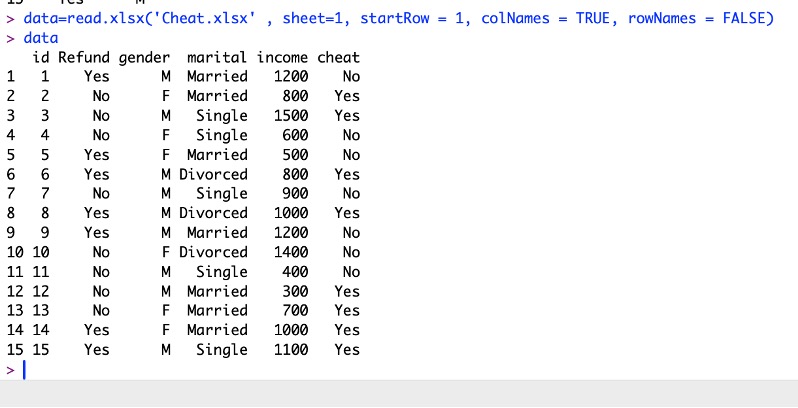
If you want to read specific columns i.e columns 2,3 the use the following commands
data= read.xlsx('Cheat.xlsx' , 1, startRow = 1, colNames = TRUE, rowNames = FALSE, cols = c(2,3))

Feedback
ABOUT
Statlearner
Statlearner STUDY
Statlearner